Digital Identity Risk Management (DIRM) Process Overview + User Guide (Draft)
This resource provides state agencies and their implementation partners with context on how and why to conduct a Digital Identity Risk Management (DIRM) process, as well as a new spreadsheet-based tool to guide agency teams through the process.
DIRM Tool and User Guide Context
The BalanceID Project is a collaboration between the National Institute of Standards and Technology (NIST), the Digital Benefits Network at the Beeck Center for Social Impact + Innovation at Georgetown University, and the Center for Democracy & Technology. This project set out to create voluntary resources to help state benefits agencies make risk-based, human-centered decisions about when and how to implement identity proofing and authentication in online applications that include Supplemental Nutrition Assistance Program (SNAP) and Medicaid.
One powerful tool government agencies can use to evaluate whether and how to use identity proofing and authentication for specific online services is a Digital Identity Risk Management (DIRM) process, as described in NIST’s Digital Identity Guidelines. Building on our team’s work and stakeholder engagement, we are releasing a draft DIRM process tool specifically tailored to the unique context of delivering SNAP and Medicaid applications and portals.
Download a version of the tool which includes macros to enable printing.
On this page we provide resources to help agencies understand and use the draft tool, including:
- An overview of the DIRM process as outlined in Revision 4 of NIST’s Digital Identity Guidelines (Special Publication 800-63-4)
- A user guide for a DIRM process tool interested agencies can use to complete the DIRM process
- A description of and resources for approaching the final step of the DIRM process: continuous evaluation and improvement of your identity management approach
Please refer back to the BalanceID team’s “Digital Identity 101” draft publication for an introduction to key concepts and processes.
You can use the DIRM process tool to support work on a new or existing portal, including if you are working on:
- Evaluating your current account and identity verification approach
- Creating a new integrated eligibility and enrollment portal
- Adding new features or programs to an existing portal
- Implementing a new single sign-on service
Tools and processes are only meaningful if they work for you and your organization. If an agency is unable to take on the DIRM process in its entirety at this time, understanding the goals of the process and using pieces of the tool may still be beneficial to the agency’s work. For example, an agency might choose to use part of the DIRM process like “Define the Online Service” to update cross-team documentation and understanding of their agency’s online application. The DIRM process might also be folded into existing agency activities. Ultimately, it’s beneficial to have shared documentation that outlines the approach your agency takes to identity management. The DIRM process is one way to do that but not the only way.
The DIRM process tool available for download is a draft product. We are releasing this tool publicly as a beta version, so that interested individuals and organizations can explore the tool and provide feedback. Any feedback can be submitted via email to balanceID-DIRM@georgetown.edu.
DIRM Process Overview
The Digital Identity Risk Management (DIRM) process focuses on identifying and managing two types of risks:
- Risks that can be managed by the identity system (for example, privacy or security risks that stem from unauthorized access or impersonation)
- Risks presented by the identity system itself (for example, the privacy or customer experience risks that stem from an inappropriately-tuned identity management system)
You will consider these risks across three different processes:
- Identity proofing
- Authentication
- Federation
To assess the first kind of risks, you will ask about:
- Identity proofing: What are the risks to the online service and its users if an imposter successfully impersonates a legitimate user to gain access to a service?
- Authentication: What are the risks to the service and its users if an imposter authenticates and accesses an account that’s not rightfully theirs?
- Federation: What risks do the service and its users face if an imposter successfully accesses an online service using a third-party system, resulting in information being accessed without authorization or manipulated while in transit between systems?
To assess those risks created by the identity system itself, you will ask about:
- Identity proofing: What are the risks to the service and its users…
- If eligible applicants are prevented from enrolling in a program due to a burdensome identity proofing process?
- If the data supplied for identity proofing is breached?
- If the identity assurance level (IAL) does not completely address specific threats, threat actors, and types of fraud?
- Authentication: What are the risks to the service and its users…
- If legitimate users are unable to successfully authenticate when trying to access their account or update their information?
- If the authentication assurance level (AAL) does not completely address potential risks or attack methods?
- Federation: What are the risks to the service and its users…
- If the wrong online service or system is able to access users’ personal information?
- If the federation service or system prevents legitimate users from enrolling in or updating their information in a system?
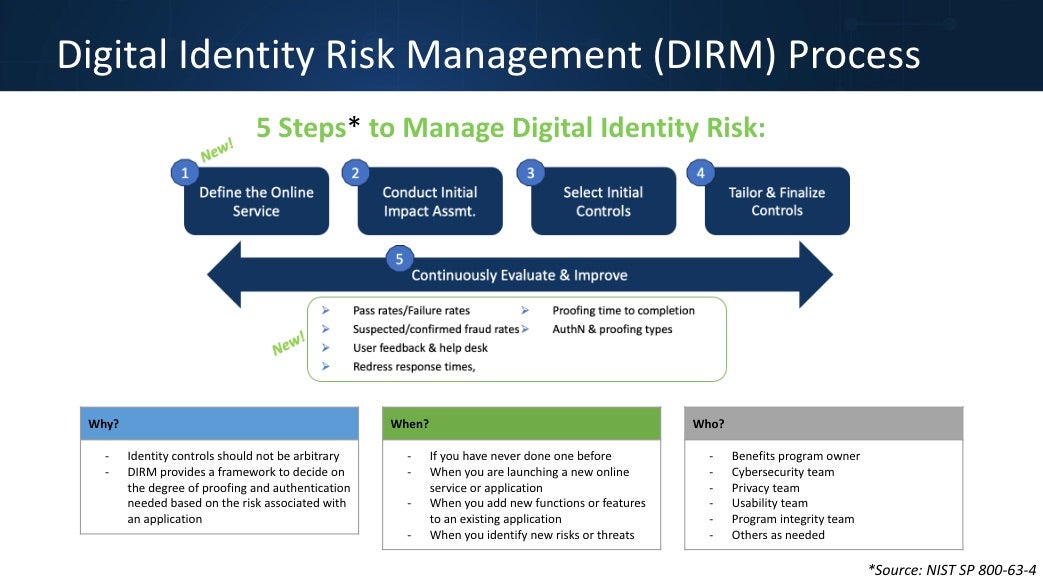
In the five-step DIRM process, you will assess both types of risk for your service, determine the appropriate assurance levels, and tailor your approach to achieving these assurance levels based on the needs of your organization, service, and users. (Step 5, which happens on an ongoing basis after the initial DIRM process, is addressed below.)
Get a Refresher on Identity Key Concepts
This video presentation defines core concepts related to digital identity management. The session is designed to help teams build a shared vocabulary and baseline understanding of key concepts.
Who should participate in a DIRM process?
When completing a DIRM process for your agency, you will want to engage a multi-disciplinary team that includes perspectives from program administration, policy, cybersecurity, program integrity, privacy, and usability, as well as business system owners or product managers. You may also want to include the perspectives of frontline staff (e.g., caseworkers, client support workers, and call center representatives) and, in some cases, impacted community members. The specific roles you include will vary based on your agency. Ensure that you identify a team member who can own the process (a DIRM Process Leader), as well as establish which team members are responsible for implementing the results of the DIRM process.
Learn More About the DIRM Process
This video describes at a high-level the Digital Identity Risk Management process outlined in NIST’s Digital Identity Guidelines. It outlines the key steps involved, and describes why a risk management approach can be helpful to agencies as they develop their approach to identity management.
DIRM Process Steps
The steps described below align with the DIRM process as described in the NIST guidelines. The steps are further broken down in the DIRM process tool.
Let’s look at what to expect throughout the DIRM process:
1. Define the online service
The goal of defining the online service is to establish a common understanding of the context and circumstances that influence your organization’s risk management decisions. The information you gather during this step should inform the following steps of the DIRM process.
You’ll answer the following questions to define your online service (in this case, your benefits application or portal):
- What are your organization’s missions and objectives?
- What are your organization’s risk management priorities and access considerations?
- Which benefits and types of transactions are included in the online application/portal and what role does the application/portal play in your organization? How is it tied to your organization’s mission and business objectives?
- What functionalities does the application or portal offer?
- What is the business process (or agency activity, e.g., application submissions, renewals) the application or portal supports?
- What populations or types of users does the portal serve, and how do those users access the service? Groups might include:
- Agency staff (administrative users)
- First-time applicants
- Returning beneficiaries
- Family members or caregivers
- Other individuals assisting beneficiaries or applicants:
- Community assisters
- Navigators
- What do you know about the external populations you serve? What obstacles might they face when accessing your service?
- What laws and rules must your service comply with?
- Has your organization undertaken any digital identity risk assessments for the service? If so, what were the results? What identity verification and authentication tools does the portal/application currently use, if any?
After defining the online service, you will also further specify the user groups that access the service, and impacted entities—individuals and/or organizations that are impacted by the online service (whether or not they use the service), and could be impacted by unauthorized access to the portal (e.g., applicants and beneficiaries, a state benefits administering agency, a technology provider, etc).
The outcome of this step includes a) a summary of what your online benefits service does, who uses it, and how they access it; b) defined user groups; and c) clearly specified impacted entities.
2. Conduct initial impact assessment
In this step, you’ll use existing research and data to analyze how a service compromise could affect both users and your organization. Focus first on risks to the online service that the identity management system is intended to address—those created by unauthorized access to specific types of user accounts. Specifically, you will:
- Outline broad impact categories—such as damage to reputation, unauthorized access to information, financial loss—and specific potential harms (e.g., to individuals and your organization) that fall into each of those impact categories.
- For each user group, assess the level of impact (low, moderate, or high) from unauthorized access to the service (through a compromise to identity proofing, authentication, and/or federation functions) on all impact categories and impacted entities.
The outcome of this step is a set of potential impacts and associated impact levels for each user group.
3. Select initial assurance levels and baseline controls
In this step, you’ll assess potential impacts to determine which assurance levels will protect the online service and its users from unauthorized access and fraud.
For each user group, select an identity assurance level (IAL), authentication assurance level (AAL), and federation assurance level (FAL) between 1 (less robust security control baseline) and 3 (more robust security control baseline). The security control baseline is your starting point for tailoring, which will occur in the next step.
Different user groups will likely have different assurance levels based on the actions and data they have access to, although the specifics vary across applications and portals. For example, in the case of SNAP:
- Existing beneficiaries may need to view benefits balances, personal contact information, and renewal forms.
- Agency staff may view identification and verification documents, requiring a higher assurance level.
- Other users—like new applicants—may only submit applications, requiring a lower assurance level.
For instance, agency staff will likely require a higher assurance level than new applicants. What programs someone is applying for or
receiving, or whether they are engaging with multiple programs may also inform the needed assurance level.
For each user group, you will identify the baseline assurance level and its associated baseline controls—the security measures used to protect users’ identity—that your identity system will use. These should be based on the options and requirements listed in the companion volumes of NIST’s Digital Identity Guidelines: SP 800-63A (IAL), SP 800-63B (AAL), and SP 800-63C (FAL). Read more about assurance levels in NIST’s guidelines, or in the BalanceID publication: Digital Identity 101: An Introduction to Digital Identity in Public Benefits Programs.
The outcome of this step is an initial Identity Assurance Level (IAL), Authentication Assurance Level (AAL), and Federation Assurance Level (FAL) for each user group.
4. Tailor and document assurance levels
In this step, you’ll assess both the risks that might be presented by the identity system itself given the assurance levels and baseline controls you selected in the previous step (e.g., how they might impact privacy and usability for users), and assess how well the selected assurance levels and controls might manage privacy or security risks. You may choose to modify initial assurance levels, adding compensating or supplemental controls. Tailoring is about making your controls work for your context.
Throughout this process, you’ll document and justify your assessments and decisions. For example:
- As a compensating control, an agency might accept using weaker forms of evidence for identity because users are likely to lack certain kinds of documentation or identification, and instead implement stricter auditing and transactional review processes on payments.
- As a supplemental control, an organization might require users to use phishing-resistant authentication at Authentication Assurance Level 2 (AAL2), or, when facing frequent fraud attempts, require additional identity verification beyond the standard requirements of the IAL.
You might want to include a solution or approach that is not documented in the digital identity guidelines to help you manage an acceptable level of risk for your organization. In that case, it’s important to document your approach and reasoning.
The outcome is a Digital Identity Acceptance Statement (DIAS) (See section 3.4.4 in SP 800-63-4) with a defined set of assurance levels and a final set of controls for the online service.
5. Continuously evaluate and improve
After you identify and tailor your assurance levels, you will make a plan to continuously evaluate your approach. Continuous evaluation helps you understand if your selected assurance levels are meeting your organizations’ needs and addressing risks, and informs adjustments and improvements.
The outcomes of Step 5 are defined performance metrics, documented and transparent processes for evaluation and redress, and ongoing improvements to the identity management system. Unlike Steps 1-4 in the DIRM process, continuous evaluation and improvement is an ongoing process you will perform regularly. More specific performance metrics, including examples, are offered below, in the Continuous Evaluation and Improvement section of this document.
DIRM Tool User Guide (Benefits Use Case)
Put the Process into Action
The spreadsheet-based DIRM process tool provides a framework for completing a Digital Identity Risk Assessment consistent with the Digital Identity Risk Management (DIRM) process as defined in NIST’s Digital Identity Guidelines (SP 800-63-4). This version of the tool is pre-populated with information that may be helpful for a state benefits portal or application that includes SNAP and Medicaid.
This tool breaks down the steps of the DIRM process into smaller pieces to help you and your team work through the process. From left to right, you will use worksheets to complete the steps of the DIRM process; the worksheets map to the DIRM process steps as described below:
- Step 1: Define the Online Service
- Worksheet 1: Define online service (in this case, a public benefits application or portal)
- Worksheet 2: Define user groups
- Worksheet 3: Identify impacted entities
- Step 2: Conduct Initial Impact Assessment + Step 3: Select Initial Assurance Levels
- Worksheet 4: Define impact categories and harms (resulting from unauthorized access to the service)
- Worksheet 5: Conduct an initial impact assessment, then identify baseline assurance levels
- Step 4: Tailor and Document
- Worksheet 6: Tailor your approach to address the specific needs of your service and mitigate risks created by the baseline assurance levels you selected in the previous step
- Worksheet 7: Create your Digital Identity Acceptance Statement
- Step 5: Continuously Evaluate and Improve
- Worksheet 8: Continuous evaluation planning
Using this tool, you will be able to create a Digital Identity Acceptance Statement (Worksheet 7), which can be used to inform the implementation of identity controls for your online service. Working through this tool, you will consider security risks, as well as privacy and usability questions.
User Notes:
- As noted above, this tool is specifically set up for teams that manage an online benefits portal, including SNAP and Medicaid.
- In the second to last tab in the sheet “Sample Inputs,” you can find sample responses for important parts of the process (e.g., sample user groups for Medicaid and SNAP portals, potentially impacted entities for a Medicaid and SNAP portal, as well as impact categories and harms).
- Within the sheet itself, these sample inputs are prepopulated where relevant. You can and should edit the sample text to match your context.
- The worksheets build upon each other, so information you input or edit in one worksheet will inform the next. We have used formulas, so that information edited in a preceding worksheet will update in subsequent tabs where relevant.
- Color-coding indicates which cells are headers, which cells contain explanatory text and instructions, and which cells are meant to be edited. We have also used Excel features to lock non-editable cells.
To complete the DIRM process, you will need to engage a multi-disciplinary team. Your team should engage a range of perspectives, including: program administration/policy, cybersecurity, program integrity, privacy, and usability, as well as business system owners or product managers. You may also want to include the perspectives of frontline staff (e.g., caseworkers, client support workers, and call center representatives) and, in some cases, impacted community members. The specific roles you include will vary based on your agency. You will want to identify a team member who can own the process (e.g., a DIRM Process Leader), as well as establish which team members are responsible for implementing the results of the DIRM process.
Download a version of the tool which includes macros to enable printing.
The DIRM process tool available for download is a draft product. We are releasing this tool publicly as a beta version, so that interested individuals and organizations can explore the tool and provide feedback. Any feedback can be submitted via email to balanceID-DIRM@georgetown.edu.
Continuous Evaluation and Improvement
Unlike Steps 1-4 in the DIRM process, Step 5: Continuous Evaluation and Improvement is an ongoing process you will perform regularly. After you identify and tailor your assurance levels, you will make a plan to continuously evaluate your approach. Continuous evaluation helps you understand if your selected assurance levels are meeting your organizations’ needs and addressing risks, and informs adjustments and improvements.
To do this well, you will need to:
- Determine which performance metrics you want to track
- Know how to get relevant data from your system, users, and vendors to track your performance metrics
You will use these inputs to determine how well your selected assurance levels and controls meet mission, business, security, and program integrity needs. In addition to assessing your own system, it is important to continuously monitor the evolving threat landscape and investigate new ways to improve security, usability, customer experience, or privacy.
This section offers guidance for completing this step in the DIRM process, such as what information you’ll need access to, performance metrics you should consider tracking, and steps to launch your continuous evaluation approach.
After completing this step in the DIRM process, you will have a clear understanding of how to continuously evaluate the ways identity is managed in your public benefits portal.
Performance Metrics
What measures should you look at to ensure your system is behaving as expected?
To evaluate the performance of your identity system, choose metrics that span the whole of your organization’s identity management process—from enrollment and proofing to regular authentication and account deletion. You should select metrics that help you understand the system holistically, considering user experience and security.
Tracking metrics is just one part of the evaluation process. You will also want to establish targets or goals for your system performance to measure these metrics against (e.g., a target of X% of users get through the account creation process successfully). In order to set realistic targets, you may need to operate your identity system for a period of time to understand its baseline performance.
Examples of metrics to consider are below, and are included in the “Continuous Evaluation” tab of the DIRM process tool.
A note on metrics:
- This sample list may leave out metrics that are important to your organization, and include others that are not relevant for you. (We include a fuller list of metrics in the DIRM tool itself.)
- These metrics may require integration with other systems that are typically outside the control of identity management programs. For example, analytics from help desk solutions or call centers or information gathered directly from users (e.g., beneficiaries and applicants).
- Authentication failures: Percentage of attempts to authenticate that fail.
- Account recovery attempts: Number of account recovery processes that users initiate.
- Focus groups and interviews: Findings from community engagement processes with users, potential users, agency staff, etc.
- Redress requests: Number of redress requests received related to identity management.
- Fraud:
- Confirmed fraud: Percentage of transactions that are confirmed to be fraudulent through investigation or self-reporting.
- Reported fraud: Percentage of transactions reported to be fraudulent by users.
- Proofing fail rate: Percentage of users who start the identity proofing process but are unable to successfully complete all the steps.
- Proofing abandonment rate: Percentage of users who start the proofing process, but drop out without actually failing the process.
- Completion time: Average time it takes a user to complete the proofing process.
Many of these metrics can and should be broken down in different ways to give more detailed insight into how well the system is working, and for whom. For example, instead of just looking at overall failure or abandonment rates, you can separate the data by each step in the identity proofing process to see where people are getting stuck or dropping out. You can break down proofing success and failure rates based on how someone is trying to prove their identity (like whether they’re doing it in person or online, or if they’re getting help or doing it on their own), by demographics like age, or by factors relevant to your organization—like how far someone lives from the nearest field office.
A Note on Demographic Data
Demographic data can be valuable for assessing system performance, but collecting additional data also carries risks to user privacy and could make applicants wary of completing the application process. Consequently, you should typically not require additional personal information to support demographic analysis—only what is needed to provide services. Use the data you have and careful analysis of proxy data (such as ZIP codes) to support your assessment.
Confidence in Metrics
Your confidence in each metric should depend on how it is sourced. For instance, more interviews will make for more trustworthy interview findings. In particular, fraud metrics should be carefully assessed for reliability. Suspected—but unproven—instances of fraud can drive up certain metrics, particularly if an agency lacks the resources to investigate all cases of suspected fraud. (Automated fraud detection systems have been known to significantly over-detect fraud.) Agencies may make suboptimal design decisions with their identity management systems when those design choices are based on inflated or otherwise inaccurate fraud rates. To avoid this, always consider how your metrics were collected and generated.
Evaluation inputs
How do you get your chosen metric data?
You will likely have to collect your metric data from several different sources. This may involve establishing new integrations or relationships to obtain the data to evaluate your identity system. You will also want to be aware of potential limitations in the data you are working with (e.g., level of granularity or timeliness). Data sources include:
- Systems you control: In systems your organization has built or controls, your organization should determine how to extract the data from the system. In some cases, the system may already provide the necessary information. In others, the system may only provide comparable metrics rather than the original selections. If neither of these is the case, you will likely need to build additional tooling.
- Vendor or partner systems: In cases where you are working with an external party to provide authentication or identity proofing (whether that’s a private technology company or a shared government service), you will need to access data from that party. It is recommended that you build contract language to enable access to this data in real time or on a regularly agreed upon basis.
- Users: You will also want to collect data directly from your users to better understand their experiences with account creation, authentication, and identity proofing. This may include data from:
- Intercept surveys presented to users via a benefits portal
- Interviews with current users
- Focus groups with users
- Data from complaints, calls, and help requests received by your call center or customer support team(s)
- You will also want to consider:
- Emerging information on threats to your organization or similar organizations
- The results of ongoing privacy and usability assessments
Acknowledgements
We would like to thank the members of the BalanceID Working Group who provided feedback on earlier versions of this document and the DIRM process tool in 2025. Thank you as well to Sabrina Toppa for copy editing and to Rachel Meade Smith for additional content editing.
Get in Touch
Email us at balanceID-DIRM@georgetown.edu with questions or comments.